8 Gemini and ChatGPT Passport Size Photo Prompts That Actually Meet Official Size Rules, Copy Paste and Create
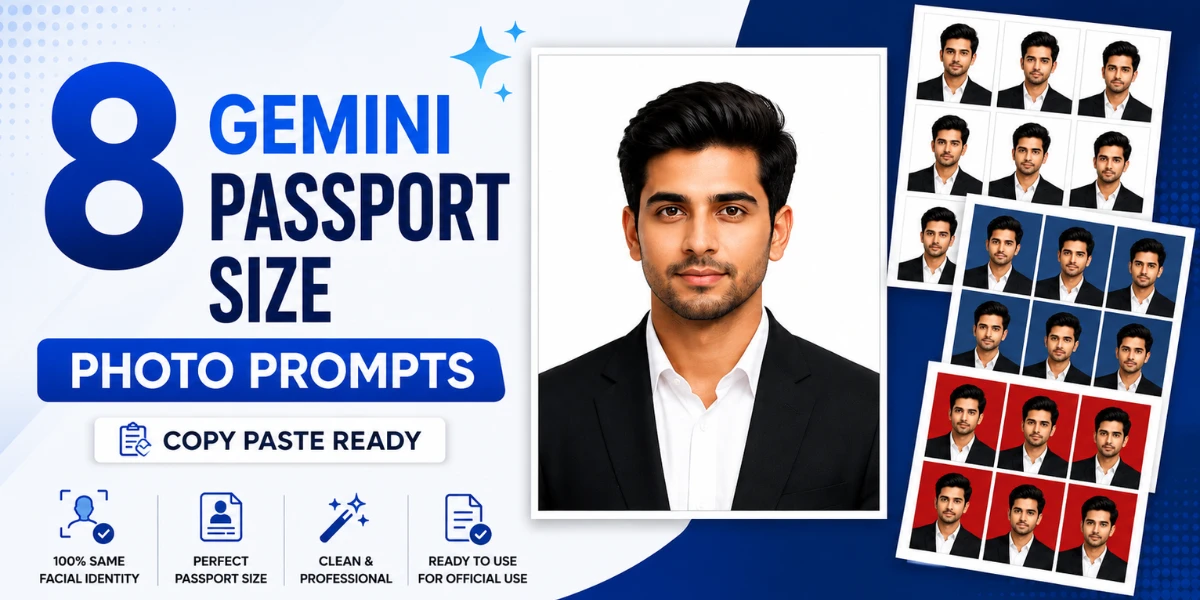
Getting a proper passport size photo usually means standing in line at a photo studio and hoping the lighting turns out okay. These 8 Gemini and ChatGPT passport size photo prompts skip all of that, you get an official size, white background, studio quality photo using just one selfie. Copy any prompt below, paste it, and you have a print ready passport photo in minutes. Pick a formal outfit prompt, a background color, or even a full 9 photo print sheet, whichever one you actually need.
Table of Contents
- Gemini Passport Size Photo Prompt for a Classic Black Coat Look
- This White Shirt Passport Photo Looks Exactly Like a Studio Shot
- ChatGPT Passport Photo Prompt for a Fresh Royal Blue Shirt Look
- Can Gemini Really Turn Your Own Outfit Into a Passport Photo?
- Gemini Passport Size Photo Prompt That Keeps Your Exact Outfit, No Studio Needed
- The Red Background Passport Photo Most Visa Forms Actually Ask For
- ChatGPT Passport Photo Prompt for a Premium Wool Coat Corporate Look
- Which Prompt Prints 9 Passport Photos on One Sheet?
- Gemini and ChatGPT AI Photo Prompts Pro Tips
- Tips to Get a Passport Photo That Actually Gets Accepted
- How to Use These Prompts on Gemini
- How to Use These Prompts on ChatGPT
- Frequently Asked Questions
| Prompt Style | Best For | Mood |
|---|---|---|
| Classic Black Coat | Job applications | Formal professional |
| White Shirt Only | Student ID | Clean simple |
| Royal Blue Shirt | Government forms | Fresh professional |
| Keep Outfit, Precise Cutout | Visa applications | Natural authentic |
| Keep Outfit, Simple Version | Office ID card | Quick practical |
| Red Background Portrait | Visa or exam form | Bold formal |
| Premium Wool Coat | Corporate ID | Polished premium |
| 9 Photo Print Sheet | Multiple documents at once | Efficient practical |
Gemini Passport Size Photo Prompt for a Classic Black Coat Look
This one dresses you in a sharp black formal coat over a crisp white shirt, no tie, and drops in a completely plain white studio background behind you. What stood out the first time I ran this was how well it kept the original shape of my face and skin texture instead of smoothing everything into that overly polished AI look most passport tools give you. The coat itself came out looking properly tailored, clean stitching and natural folds, not stiff or flat like a cardboard cutout. This is the safest, most universally accepted option if you just need one solid passport photo for any application.
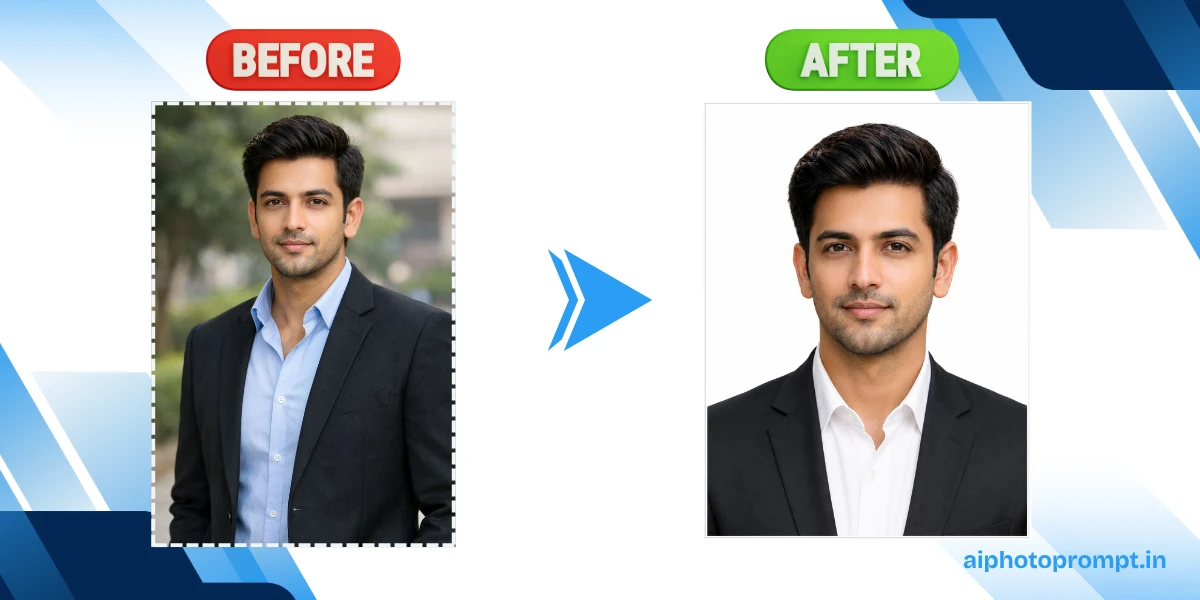
Copy the prompt below and paste it into Gemini:
Treat the uploaded image strictly as a facial identity reference only. The uploaded image is NOT the final composition. Extract and preserve only the person’s exact facial identity, including facial proportions, face shape, forehead, cheeks, jawline, chin, ears, eyes, eyebrows, eyelashes, nose, nostrils, lips, teeth, beard or moustache, facial hair density and pattern, skin tone, natural complexion, pores, wrinkles, freckles, moles, scars, facial asymmetry, natural skin texture, hairstyle around the face, hairline, sideburns, flyaway hairs, neck proportions, and the exact neutral facial expression. Preserve every facial detail exactly as in the uploaded image. Do not beautify, enhance, regenerate, improve, reshape, smooth, or make the person more attractive. Identity preservation has the highest priority. Completely ignore and discard the original clothing, shoulders, chest, upper body, posture, crop, framing, background, lighting, camera angle, environment, perspective, and composition from the uploaded image. Do not edit the uploaded photograph. Instead, generate a completely new professional passport portrait using only the preserved facial identity. Create a naturally proportioned upper body with realistic shoulders and neck. Dress the subject in a premium tailored black formal business coat over a crisp white formal shirt without a tie. The coat should have realistic fabric texture, accurate stitching, natural folds, proper collar alignment, and a professional fit. Generate a completely new body that blends naturally with the preserved face.
Replace the background with a perfectly clean seamless pure white (#FFFFFF) studio background. The background must be completely uniform without shadows, gradients, textures, wrinkles, patterns, or objects. Position the subject facing directly toward the camera with the head perfectly straight, shoulders level, eyes looking directly into the camera, mouth closed, and a natural neutral passport expression. Apply professional passport studio lighting using soft diffused front lighting with balanced exposure, realistic skin tones, accurate white balance, natural contrast, and DSLR-quality sharpness while preserving authentic skin texture and facial details. Generate the final image in the official Indian passport photo format (35 mm × 45 mm) with portrait orientation only. Never generate a square image. Maintain proper headroom above the hair, both shoulders clearly visible, and the face occupying approximately 70% of the frame according to Indian passport photo guidelines. Export as a high-resolution print-ready image at 300 DPI. Add a thin clean white border on all four sides suitable for passport photo printing and easy trimming. The final result must look like a newly captured professional passport studio photograph, not an edited version of the uploaded image. Use the uploaded image only to preserve the person’s facial identity. Negative Prompt: Do not preserve the original background, original clothing, original body, original crop, original framing, original posture, original lighting, or original composition. Do not beautify the face. Do not smooth the skin. Do not sharpen the jawline. Do not enlarge the eyes. Do not modify the nose, lips, beard, hairstyle, hairline, ears, skin tone, age, gender, ethnicity, facial proportions, or natural facial imperfections. No beauty filters, glamour retouching, makeup enhancement, HDR effects, oversharpening, illustration, painting, CGI, cartoon, anime, blur, watermark, text, logo, duplicate face, extra limbs, distorted anatomy, AI artifacts, unrealistic rendering, or square image.
Also check this prompt post: 9 Gemini and ChatGPT Prompts for a Traditional Look for Girl in India’s Most Iconic Silk Sarees, Just Copy and Paste
This White Shirt Passport Photo Looks Exactly Like a Studio Shot
This prompt keeps things simple, just a plain white formal shirt with a classic collar, no coat, no tie, against the same clean white background. After running this one twice, here is what stood out, the shirt fabric held realistic folds and texture instead of looking flat or plastic, which is usually where AI passport generators fall apart. This is a great lightweight option if a full coat feels like overkill for what you actually need the photo for. Use this one for a student ID, a college application, or anything that does not require full formal wear.

Try this prompt on ChatGPT:
Treat the uploaded image strictly as a facial identity reference only. The uploaded image is NOT the final composition. Extract and preserve only the person’s exact facial identity, including facial proportions, face shape, forehead, cheeks, jawline, chin, ears, eyes, eyebrows, eyelashes, nose, nostrils, lips, teeth, beard or moustache, facial hair density and pattern, skin tone, natural complexion, pores, wrinkles, freckles, moles, scars, facial asymmetry, natural skin texture, hairstyle around the face, hairline, sideburns, flyaway hairs, neck proportions, and the exact neutral facial expression. Preserve every facial detail exactly as in the uploaded image. Do not beautify, enhance, regenerate, improve, reshape, smooth, or make the person more attractive. Identity preservation has the highest priority. Completely ignore and discard the original clothing, shoulders, chest, upper body, posture, crop, framing, background, lighting, camera angle, environment, perspective, and composition from the uploaded image. Do not edit the uploaded photograph. Instead, generate a completely new professional passport portrait using only the preserved facial identity. Create a naturally proportioned upper body with realistic shoulders and neck. Dress the subject in a premium white formal shirt with a classic collar, realistic cotton fabric texture, natural folds, clean stitching, proper fitting, and a professional appearance. Do not generate a coat, blazer, jacket, or tie. Replace the background with a perfectly clean seamless pure white (#FFFFFF) studio background. Position the subject facing directly toward the camera with the head perfectly straight, shoulders level, eyes looking directly into the camera, mouth closed, and a natural neutral passport expression.
Apply professional passport studio lighting using soft diffused front lighting with balanced exposure, realistic skin tones, accurate white balance, natural contrast, and DSLR-quality sharpness while preserving authentic skin texture and facial details. Generate the final image in the official Indian passport photo format (35 mm × 45 mm) with portrait orientation only. Never generate a square image. Maintain proper headroom above the hair, both shoulders clearly visible, and the face occupying approximately 70% of the frame according to Indian passport photo guidelines. Export as a high-resolution print-ready image at 300 DPI. Add a thin clean white border on all four sides suitable for passport photo printing and easy trimming. The final result must look like a newly captured professional passport studio photograph, not an edited version of the uploaded image. Use the uploaded image only to preserve the person’s facial identity. Negative Prompt: Do not preserve the original background, original clothing, original body, original crop, original framing, original posture, original lighting, or original composition. Do not beautify the face. Do not smooth the skin. Do not sharpen the jawline. Do not enlarge the eyes. Do not modify the nose, lips, beard, hairstyle, hairline, ears, skin tone, age, gender, ethnicity, facial proportions, or natural facial imperfections. No beauty filters, glamour retouching, makeup enhancement, HDR effects, oversharpening, illustration, painting, CGI, cartoon, anime, blur, watermark, text, logo, duplicate face, extra limbs, distorted anatomy, AI artifacts, unrealistic rendering, or square image.
Also check this prompt post: 7 Gemini and ChatGPT Prompts for a Traditional Look for Girl in a South Indian Temple Saree, Copy and Use
ChatGPT Passport Photo Prompt for a Fresh Royal Blue Shirt Look
A royal blue formal shirt instead of the usual white or black, this prompt gives you a slightly fresher, less rigid passport photo while staying completely professional. The blue against the pure white background creates just enough contrast to make the photo look a little more alive than a plain black and white combination. Someone in my family used this exact prompt for her government exam form and it got accepted without any resubmission request, which does not always happen with photo studio prints either. This is a solid pick if your form allows some flexibility in shirt color.

Paste this one into Gemini and see what happens:
Treat the uploaded image strictly as a facial identity reference only. The uploaded image is NOT the final composition. Extract and preserve only the person’s exact facial identity, including facial proportions, face shape, forehead, cheeks, jawline, chin, ears, eyes, eyebrows, eyelashes, nose, nostrils, lips, teeth, beard or moustache, facial hair density and pattern, skin tone, natural complexion, pores, wrinkles, freckles, moles, scars, facial asymmetry, natural skin texture, hairstyle around the face, hairline, sideburns, flyaway hairs, neck proportions, and the exact neutral facial expression. Preserve every facial detail exactly as in the uploaded image. Do not beautify, enhance, regenerate, improve, reshape, smooth, or make the person more attractive. Identity preservation has the highest priority. Completely ignore and discard the original clothing, shoulders, chest, upper body, posture, crop, framing, background, lighting, camera angle, environment, perspective, and composition from the uploaded image. Do not edit the uploaded photograph. Instead, generate a completely new professional passport portrait using only the preserved facial identity. Create a naturally proportioned upper body with realistic shoulders and neck. Dress the subject in a premium royal blue formal business shirt with a classic collar, realistic cotton fabric texture, natural folds, accurate stitching, and professional fitting. Do not generate a blazer, coat, jacket, or tie. Replace the background with a perfectly clean seamless pure white (#FFFFFF) studio background.
Position the subject facing directly toward the camera with the head perfectly straight, shoulders level, eyes looking directly into the camera, mouth closed, and a natural neutral passport expression. Apply professional passport studio lighting using soft diffused front lighting with balanced exposure, realistic skin tones, accurate white balance, natural contrast, and DSLR-quality sharpness while preserving authentic skin texture and facial details. Generate the final image in the official Indian passport photo format (35 mm × 45 mm) with portrait orientation only. Never generate a square image. Maintain proper headroom above the hair, both shoulders clearly visible, and the face occupying approximately 70% of the frame according to Indian passport photo guidelines.
Export as a high-resolution print-ready image at 300 DPI. Add a thin clean white border on all four sides suitable for passport photo printing and easy trimming. The final result must look like a newly captured professional passport studio photograph, not an edited version of the uploaded image. Use the uploaded image only to preserve the person’s facial identity. Negative Prompt: Do not preserve the original background, original clothing, original body, original crop, original framing, original posture, original lighting, or original composition. Do not beautify the face. Do not smooth the skin. Do not sharpen the jawline. Do not enlarge the eyes. Do not modify the nose, lips, beard, hairstyle, hairline, ears, skin tone, age, gender, ethnicity, facial proportions, or natural facial imperfections. No beauty filters, glamour retouching, makeup enhancement, HDR effects, oversharpening, illustration, painting, CGI, cartoon, anime, blur, watermark, text, logo, duplicate face, extra limbs, distorted anatomy, AI artifacts, unrealistic rendering, or square image.
Also check this prompt post: 7 Gemini and ChatGPT Sharara Dress AI Photo Prompts for a Dreamy Flower Garden Shoot, Ready to Copy
Can Gemini Really Turn Your Own Outfit Into a Passport Photo?
Short answer, yes, and this is the prompt that actually does it properly. Instead of dressing you in a new outfit, this one keeps whatever you are already wearing in your uploaded photo and just swaps the background to plain white, hair strand by hair strand, which is a much harder edit than it sounds. I did not expect the flyaway hairs and shoulder edges to stay this clean, most background removal tools leave a slightly fuzzy or cut out edge around the hair. This is the one to use if your original outfit already matches the dress code and you just need the background fixed.

Copy and paste this directly into ChatGPT:
Treat the uploaded image strictly as a facial identity reference only. The uploaded image is NOT the final composition. Extract and preserve only the person’s exact facial identity, including facial proportions, face shape, forehead, cheeks, jawline, chin, ears, eyes, eyebrows, eyelashes, nose, nostrils, lips, teeth, beard or moustache, facial hair density and pattern, skin tone, natural complexion, pores, wrinkles, freckles, moles, scars, facial asymmetry, natural skin texture, hairstyle around the face, hairline, sideburns, flyaway hairs, neck proportions, and the exact neutral facial expression. Preserve every facial detail exactly as in the uploaded image. Do not beautify, enhance, regenerate, improve, reshape, smooth, or make the person more attractive. Identity preservation has the highest priority. Completely ignore and discard the original background, lighting, framing, crop, camera angle, environment, and composition from the uploaded image. Preserve the original clothing exactly as it appears in the uploaded image. Do not replace, regenerate, recolor, modify, or enhance the clothing in any way. Keep the original outfit, folds, texture, and appearance unchanged while generating a new professional passport composition.
Carefully remove the entire background using precise subject separation while preserving every individual hair strand, flyaway hair, ears, shoulders, collar edges, and clothing edges with clean natural masking.
Replace the background with a perfectly clean seamless pure white (#FFFFFF) studio background without gradients, shadows, textures, wrinkles, patterns, or objects. Position the subject facing directly toward the camera with the head perfectly straight, shoulders level, eyes looking directly into the camera, mouth closed, and a natural neutral passport expression. Apply professional passport studio lighting using soft diffused front lighting with balanced exposure, realistic skin tones, accurate white balance, natural contrast, and DSLR-quality sharpness while preserving authentic skin texture and facial details. Generate the final image in the official Indian passport photo format (35 mm × 45 mm) with portrait orientation only. Never generate a square image. Maintain proper headroom above the hair, both shoulders clearly visible, and the face occupying approximately 70% of the frame according to Indian passport photo guidelines. Export as a high-resolution print-ready image at 300 DPI. Add a thin clean white border on all four sides suitable for passport photo printing and easy trimming. The final result must look like a newly captured professional passport studio photograph while preserving the original clothing exactly as uploaded.
Negative Prompt: Do not modify the clothing. Do not beautify the face. Do not smooth the skin. Do not reshape facial features. Do not modify hairstyle, beard, skin tone, age, gender, ethnicity, facial proportions, or natural facial imperfections. No beauty filters, glamour retouching, HDR effects, illustration, painting, CGI, cartoon, anime, blur, watermark, text, logo, duplicate face, extra limbs, distorted anatomy, AI artifacts, unrealistic rendering, or square image.
Gemini Passport Size Photo Prompt That Keeps Your Exact Outfit, No Studio Needed
This is a lighter version of the same idea, keep your own clothing exactly as it is, just replace the background with plain white and fix the lighting and framing to match passport rules. It works faster and a little more reliably than the detailed cutout version if your original photo already has a fairly plain background to begin with. This is the quickest option in the whole set when you already like how you look and just need the technical passport formatting sorted out. Good for a workplace ID card or any document that does not require formal business wear.

This is the one, copy it and paste into Gemini:
Treat the uploaded image strictly as a facial identity reference only. The uploaded image is NOT the final composition. Extract and preserve only the person’s exact facial identity, including facial proportions, face shape, forehead, cheeks, jawline, chin, ears, eyes, eyebrows, eyelashes, nose, nostrils, lips, teeth, beard or moustache, facial hair density and pattern, skin tone, natural complexion, pores, wrinkles, freckles, moles, scars, facial asymmetry, natural skin texture, hairstyle around the face, hairline, sideburns, flyaway hairs, neck proportions, and the exact neutral facial expression. Preserve every facial detail exactly as in the uploaded image. Do not beautify, enhance, regenerate, improve, reshape, smooth, or make the person more attractive. Identity preservation has the highest priority. Ignore the original background, lighting, framing, crop, camera angle, environment, and composition. Preserve the original clothing exactly as it appears in the uploaded image without replacing or modifying it. Generate a completely new professional passport portrait using only the preserved facial identity and the original clothing. Replace the background with a perfectly clean seamless pure white (#FFFFFF) studio background that is evenly illuminated without gradients, textures, shadows, wrinkles, or objects. Position the subject facing directly toward the camera with a neutral passport expression, level shoulders, straight head position, and direct eye contact. Apply professional passport studio lighting using soft diffused light with balanced exposure, realistic skin tones, accurate white balance, and DSLR-quality sharpness. Generate the final image in the official Indian passport photo format (35 mm × 45 mm) with portrait orientation only. Never generate a square image. Maintain proper headroom, visible shoulders, and official passport composition. Export as a high-resolution print-ready image at 300 DPI. Add a thin clean white border on all four sides suitable for passport photo printing. The final result must look like a newly captured professional passport photograph while preserving the original clothing exactly. Negative Prompt: Do not modify clothing. Do not beautify the face. Do not smooth skin. Do not reshape facial features. Do not change hairstyle, beard, skin tone, age, gender, ethnicity, or natural facial imperfections. No blur, watermark, text, logo, AI artifacts, illustration, painting, CGI, cartoon, anime, HDR effects, glamour retouching, or square image.
The Red Background Passport Photo Most Visa Forms Actually Ask For
Plain white is not the only color some forms ask for, and this prompt gives you a solid, evenly lit deep red studio background instead. The red comes out completely flat and shadow free, exactly the kind of clean background most visa and exam application forms specifically require. This one keeps your natural expression and skin tone exactly as they are, no beautifying, which actually matters for official documents that get compared against your real face. Save this one for any form that specifically asks for a colored background instead of white.

Try this prompt on ChatGPT:
Treat the uploaded image strictly as a facial identity reference only. The uploaded image is NOT the final composition. Extract and preserve only the person’s exact facial identity, including facial proportions, face shape, forehead, cheeks, jawline, chin, ears, eyes, eyebrows, eyelashes, nose, nostrils, lips, teeth, beard or moustache, facial hair density and pattern, skin tone, natural complexion, pores, wrinkles, freckles, moles, scars, facial asymmetry, natural skin texture, hairstyle around the face, hairline, sideburns, flyaway hairs, neck proportions, and the exact neutral facial expression. Preserve every facial detail exactly as in the uploaded image. Do not beautify, enhance, regenerate, improve, reshape, smooth, or make the person more attractive. Identity preservation has the highest priority. Completely ignore and discard the original background, lighting, framing, crop, camera angle, environment, and composition from the uploaded image. Preserve the original clothing naturally unless instructed otherwise. Replace the background with a perfectly smooth solid deep red studio background. The background must be evenly illuminated with no gradients, shadows, textures, patterns, wrinkles, or objects.
Position the subject facing directly toward the camera with a straight head position, level shoulders, closed mouth, direct eye contact, and a neutral passport expression. Apply professional passport studio lighting with balanced exposure, realistic skin tones, DSLR-quality sharpness, and accurate white balance. Generate the final image in the official Indian passport photo format (35 mm × 45 mm) with portrait orientation only. Never generate a square image. Maintain official passport framing with proper headroom and visible shoulders. Export as a high-resolution print-ready image at 300 DPI. Add a thin clean white border around all four sides suitable for passport photo printing.
The final image must look like a professionally captured passport-style studio portrait. Negative Prompt: Do not beautify the face. Do not smooth skin. Do not reshape facial features. Do not modify hairstyle, beard, complexion, or facial proportions. No blur, watermark, text, logo, HDR effects, AI artifacts, illustration, CGI, cartoon, anime, or square image.
ChatGPT Passport Photo Prompt for a Premium Wool Coat Corporate Look
This one is a slightly more premium version of the classic black coat prompt, using a heavier wool texture with more structured shoulders for a proper corporate look. The stitching detail and fabric weight on this coat photographed noticeably richer than the standard version, it genuinely looks like a tailored office blazer instead of a generic AI suit. This is the one to run if your passport photo is actually going on a corporate ID card or a formal company profile instead of a government document. It holds up well even at a bigger print size.

Copy the prompt below and paste it into Gemini:
Treat the uploaded image strictly as a facial identity reference only. The uploaded image is NOT the final composition. Extract and preserve only the person’s exact facial identity, including facial proportions, face shape, forehead, cheeks, jawline, chin, ears, eyes, eyebrows, eyelashes, nose, nostrils, lips, teeth, beard or moustache, facial hair density and pattern, skin tone, natural complexion, pores, wrinkles, freckles, moles, scars, facial asymmetry, natural skin texture, hairstyle around the face, hairline, sideburns, flyaway hairs, neck proportions, and the exact neutral facial expression. Preserve every facial detail exactly as in the uploaded image. Do not beautify, enhance, regenerate, improve, reshape, smooth, or make the person more attractive. Identity preservation has the highest priority. Completely ignore and discard the original clothing, shoulders, chest, upper body, posture, crop, framing, background, lighting, camera angle, environment, perspective, and composition from the uploaded image. Do not edit the uploaded photograph. Instead, generate a completely new professional passport portrait using only the preserved facial identity. Create a naturally proportioned upper body with realistic shoulders and neck. Dress the subject in a premium tailored black formal business coat over a crisp white formal shirt without a tie. The coat should feature realistic wool fabric texture, natural folds, clean stitching, structured shoulders, proper collar alignment, and professional tailoring suitable for official passport photographs. Replace the background with a perfectly clean seamless pure white (#FFFFFF) studio background without shadows, gradients, textures, wrinkles, patterns, or objects. Position the subject facing directly toward the camera with a straight head position, level shoulders, direct eye contact, closed mouth, and a natural neutral passport expression. Apply professional passport studio lighting using soft diffused front lighting with balanced exposure, realistic skin tones, accurate white balance, natural contrast, and DSLR-quality sharpness while preserving authentic skin texture and facial details. Generate the final image in the official Indian passport photo format (35 mm × 45 mm) with portrait orientation only. Never generate a square image. Maintain proper headroom above the hair, both shoulders clearly visible, and official passport composition. Export as a high-resolution print-ready image at 300 DPI. Add a thin clean white border on all four sides suitable for passport photo printing and easy trimming.
The final result must look like a newly captured professional passport studio photograph. Negative Prompt: Do not preserve the original clothing. Do not beautify the face. Do not smooth the skin. Do not reshape facial features. Do not modify hairstyle, beard, complexion, facial proportions, age, gender, or ethnicity. No beauty filters, glamour retouching, HDR effects, illustration, painting, CGI, cartoon, anime, blur, watermark, text, logo, duplicate face, extra limbs, distorted anatomy, AI artifacts, unrealistic rendering, or square image.
Which Prompt Prints 9 Passport Photos on One Sheet?
This last one is different from the rest, instead of one single photo, it generates a full sheet of 9 identical passport photos arranged in a neat 3 by 3 grid, ready to print and cut. My cousin used this exact prompt when she needed multiple copies for different job applications at once and saved an entire trip to the photo studio. Every photo on the sheet keeps the same framing, lighting, and clothing, so nothing looks mismatched once you cut them apart. This is the most practical prompt in the set if you know you will need more than one printed copy.
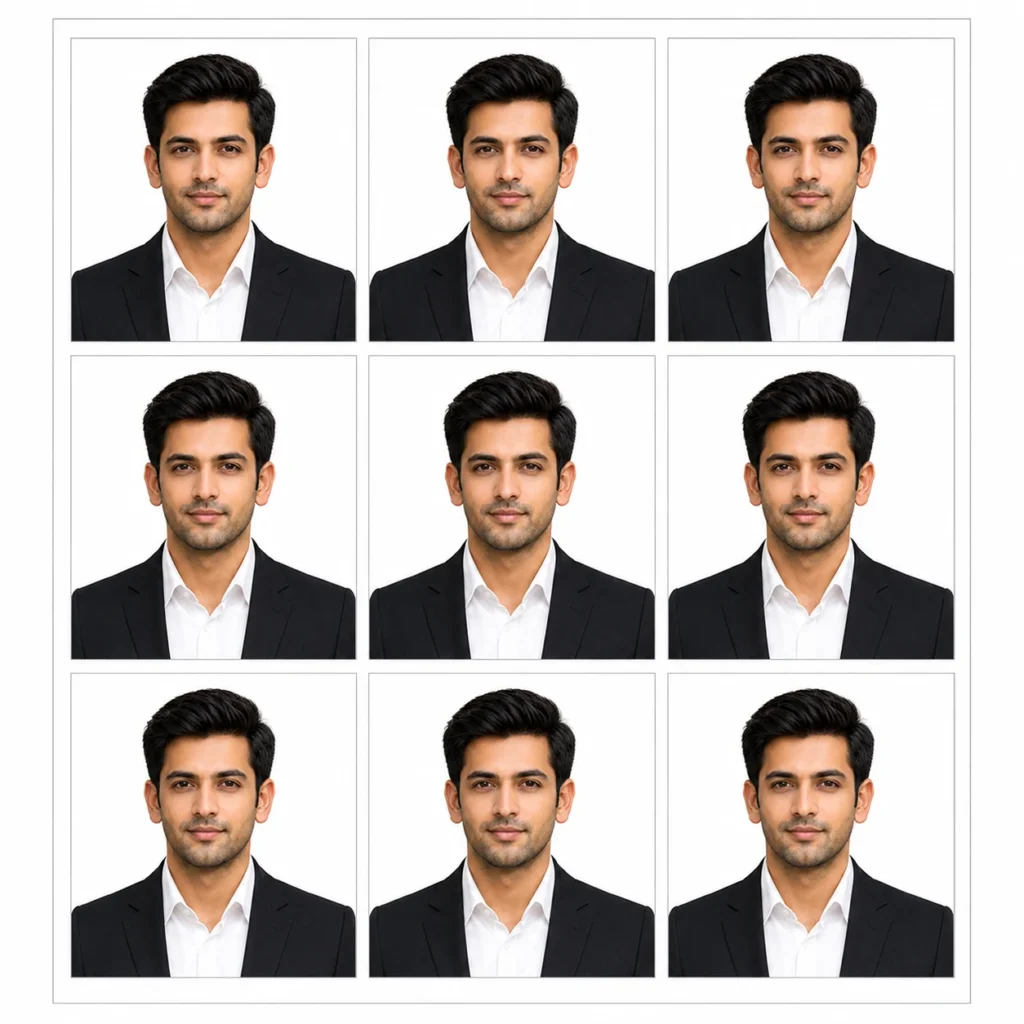
Copy and paste this directly into ChatGPT:
Treat the uploaded image strictly as a facial identity reference only. The uploaded image is NOT the final composition. Extract and preserve only the person’s exact facial identity, including facial proportions, face shape, forehead, cheeks, jawline, chin, ears, eyes, eyebrows, eyelashes, nose, nostrils, lips, teeth, beard or moustache, facial hair density and pattern, skin tone, natural complexion, pores, wrinkles, freckles, moles, scars, facial asymmetry, natural skin texture, hairstyle around the face, hairline, sideburns, flyaway hairs, neck proportions, and the exact neutral facial expression. Preserve every facial detail exactly as in the uploaded image. Do not beautify, enhance, regenerate, improve, reshape, smooth, or make the person more attractive. Identity preservation has the highest priority. Completely ignore and discard the original clothing, shoulders, chest, upper body, posture, crop, framing, background, lighting, camera angle, environment, perspective, and composition from the uploaded image. Do not edit the uploaded photograph. Instead, generate a completely new professional upper-body portrait using only the preserved facial identity. Create a naturally proportioned upper body with realistic shoulders and neck. Dress the subject in a premium tailored black formal business coat over a crisp white formal shirt without a tie. The clothing must have realistic fabric texture, clean stitching, natural folds, structured shoulders, and professional tailoring. Replace the background with a perfectly clean seamless pure white (#FFFFFF) studio background. The background must be evenly illuminated without gradients, shadows, textures, wrinkles, patterns, or objects. Position the subject facing directly toward the camera with the head perfectly straight, shoulders level, eyes looking directly into the camera, mouth closed, and a natural neutral expression.
Apply professional studio lighting using soft diffused front lighting with balanced exposure, realistic skin tones, accurate white balance, natural contrast, and DSLR-quality sharpness while preserving authentic skin texture and facial details. Generate a high-resolution print-ready photo sheet arranged in a perfectly aligned 3 × 3 grid containing exactly 9 identical photographs. Each individual photograph must measure exactly 3 × 3 cm. Every photograph must have identical framing, facial identity, clothing, lighting, background, and composition. Keep equal spacing between all photographs. Add a thin, clean white border around each individual photograph and leave a uniform white outer margin around the entire sheet for easy cutting and professional printing. Export the final image at 300 DPI with sharp print quality. The final output must contain only one printable sheet with exactly 9 identical photographs arranged in a 3 × 3 grid. Negative Prompt: Do not preserve the original clothing, background, body, crop, framing, posture, lighting, or composition. Do not beautify the face. Do not smooth the skin. Do not sharpen the jawline. Do not enlarge the eyes. Do not modify the nose, lips, beard, hairstyle, hairline, ears, skin tone, age, gender, ethnicity, facial proportions, or natural facial imperfections. No beauty filters, glamour retouching, makeup enhancement, HDR effects, oversharpening, illustration, painting, CGI, cartoon, anime, blur, watermark, text, logo, duplicate face, extra limbs, distorted anatomy, AI artifacts, additional photographs outside the 3 × 3 grid, or single-photo output.
Gemini and ChatGPT AI Photo Prompts Pro Tips
If the face changes or does not match your photo, add preserve facial identity 100%, do not alter facial features or proportions at the very beginning of the prompt and run it again.
Run every prompt 2 to 3 times. The second or third generation is almost always sharper, more detailed, and closer to what you want.
Add f/1.8 shallow depth of field anywhere in the prompt if you want a softer, DSLR style background blur in the final image.
For passport prompts, always check your specific country’s exact photo size rules before printing, this set follows the standard Indian 35mm x 45mm format.
If Gemini or ChatGPT changes your face shape slightly, rerun the prompt and mention do not beautify or smooth the face at the very start.
Tips to Get a Passport Photo That Actually Gets Accepted
A few small things make the difference between an accepted photo and a rejected one.
- Upload a clear, front facing photo with even lighting, shadows on your face can carry over into the final passport photo.
- If your country or form needs a specific background color, mention it directly in the prompt before pasting it.
- Keep your expression neutral and your mouth closed in the reference photo, the prompt copies your real expression, it does not add a smile for you.
- Do not upload a photo wearing sunglasses, a cap, or anything covering your face, passport rules require a clear, uncovered face.
- For Gemini, upload a photo where your shoulders are visible, it holds the upper body proportions more accurately that way.
- For ChatGPT, double check the output looks like a proper portrait rectangle, not a square, before downloading and printing it.
How to Use These Prompts on Gemini
Gemini is the easiest place to start if this is your first time generating an official passport photo.
1
Go to gemini.google.com and sign in with your Google account.
2
Upload one clear, well lit front facing photo with a neutral expression and no accessories covering your face.
3
Copy any prompt from this post exactly as written and paste it into the chat.
4
Wait for Gemini to generate the official size passport photo, this usually takes under a minute.
5
If the face looks smoothed or altered, add preserve facial identity 100 percent, do not beautify or smooth the face at the start of the prompt and run it again.
6
Download the final passport photo and get it printed at any local photo shop or print it yourself at 300 DPI.
How to Use These Prompts on ChatGPT
ChatGPT works just as well for these prompts, just keep your reference photo in the same message.
1
Go to chatgpt.com and open a new chat using GPT-4o.
2
Upload one clear, well lit front facing photo with a neutral expression in the same message.
3
Copy the exact prompt from this post and paste it right below the uploaded photo.
4
Let ChatGPT generate the passport photo, then check the size and background match the official format.
5
Run the prompt two to three times if the lighting looks uneven or the background is not perfectly plain.
6
Save the final image and print it at a photo shop or on your own printer at 300 DPI.
Frequently Asked Questions
Can I copy paste these Gemini passport size photo prompts directly?
Yes, every prompt in this post is copy paste ready. Just upload one clear reference photo first, then paste the prompt exactly as it is written, no editing needed.
Will these passport photo prompts work for kids and elderly people too?
Yes, these prompts are not limited to one age group or gender, they work for any face as long as the uploaded reference photo is clear and front facing.
Can I change the background color or the outfit in these prompts?
Yes, just edit the background color word or the outfit description in the prompt text before pasting it, everything else in the prompt still works the same way.
Which is the best passport size photo prompt for a government form?
The classic black coat and white shirt prompts are the safest choice for most government forms, but always check if your specific form needs a white or colored background first.
Will these AI passport photos actually get accepted for official use?
These prompts follow the standard Indian passport size and background rules, but every issuing office can have small extra requirements, so always double check your exact document’s guidelines before submitting.
Related Prompts

7 Gemini Luxury Lifestyle Prompts for Girls That Feel Like a Pinterest Editorial Shoot, Copy Paste Ready for Gemini and ChatGPT
This 2×2 Grid Prompt Trick Turns One Selfie Into a Full Editorial Shoot (Gemini and ChatGPT, Copy Paste Ready)