7 AI Photo Prompts for Boys on Gemini & ChatGPT (Copy Paste Ready)
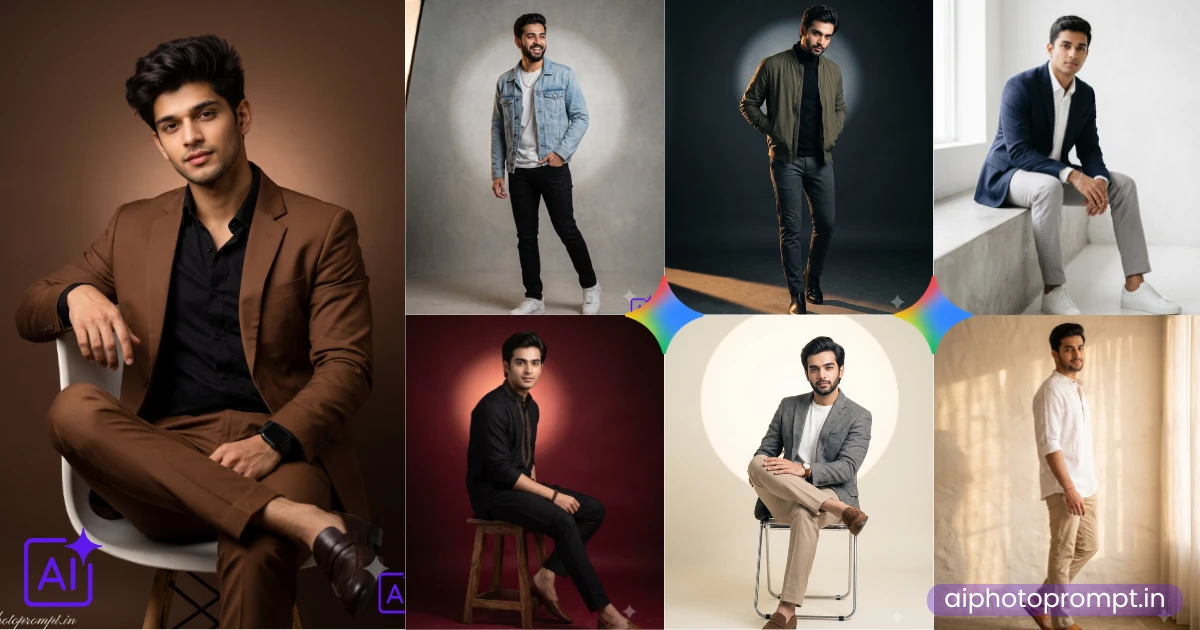
Your WhatsApp DP has looked the same for six months and you know it. These 7 AI photo prompts made for boys work on both Gemini and ChatGPT, so pick whichever app is already open on your phone. You get all 7 ready to copy, paste, and generate in seconds no editing, no guessing what to type.
Table of Contents
- The Suit That Makes Your DP Look Expensive
- That Mid-Laugh Photo Nobody Can Scroll Past
- Festival-Ready Without Even Trying
- When You Want Your Photo to Feel Like a Movie Still
- The Cleanest Profile Photo You Will Ever Have
- This One Is for Looking Effortlessly Put-Together
- Perfect for Wishing Someone Without Looking Basic
- How to Level Up These AI Prompts
- How to Use These Prompts on Gemini and ChatGPT
- Frequently Asked Questions
| Prompt Style | Best For | Mood |
|---|---|---|
| Brown Suit | Instagram DP, LinkedIn | Premium, Confident |
| Denim Jacket | Casual posts, Stories | Candid, Playful |
| Black Embroidered Kurta | Festival, Rakhi post | Traditional, Elegant |
| Olive Bomber Jacket | Profile photo, Reels cover | Moody, Dramatic |
| Grey Blazer | Clean DP, Campaign look | Bright, Commercial |
| Navy Blazer | Everyday DP, LinkedIn | Fresh, Approachable |
| White Linen Kurta | Festive casual, Everyday DP | Warm, Relaxed |
The Suit That Makes Your DP Look Expensive
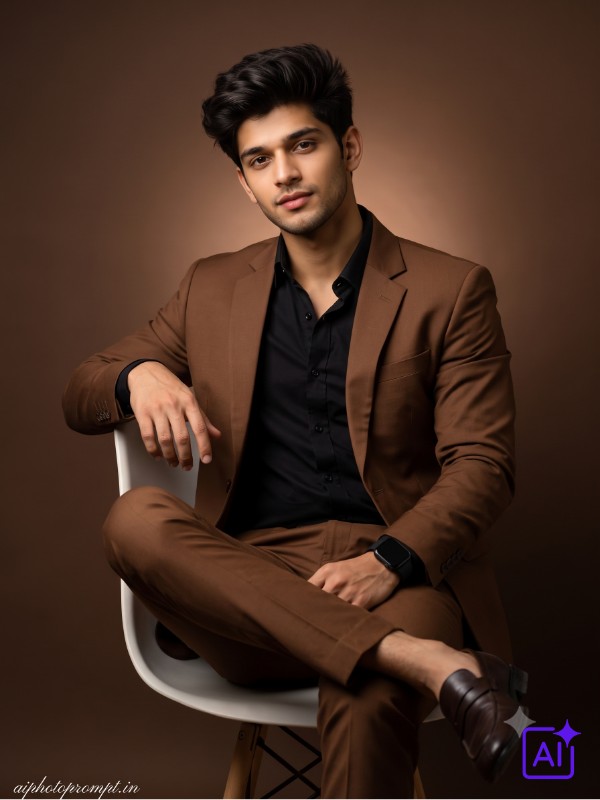
This one gives you a brown tailored suit, a black fitted shirt, and a soft backlight that glows around your shoulders like a studio ad shoot. The brown wall keeps the whole photo warm without looking too dressy or stiff. It works so well for an Instagram DP or even a LinkedIn photo when you want to look put together. Honestly, the way the light bleeds around the shoulders in this one is what gets me every time it looks like a real studio shot, not an AI photo.
Copy the prompt below and paste it into Gemini or ChatGPT:
A high-end, premium magazine-quality fashion editorial photograph of a handsome young Indian man, sitting casually with legs crossed on a minimal futuristic designer chair inside a premium studio. His face is an exact, untouched replica of the uploaded reference photo, with every single feature, including the eyes, jawline, beard shape, and skin tone, preserved precisely as they are. He wears a Pinterest-inspired brown tailored suit paired with a black fitted shirt and dark brown loafers, with a black smartwatch resting on his left wrist. His expression is confident and relaxed, looking slightly away from the camera, with one arm resting lightly on the chair backrest. The background is a solid brown wall in tone #483C32. The previously distinct glowing white circle is removed and replaced by a subtle, diffuse backlight effect coming from directly behind him (the light source itself is hidden). This creates a gentle, warm light bleed that halos softly around his head and shoulders without being visible as a geometric shape. Soft cinematic studio lighting wraps around him, providing moody contrast and sharp editorial shadows that fall across one side of his jaw. The shot is captured on a Sony A7 IV at 85mm f1.8, with the background melting into a warm painterly bokeh, while his face remains razor-sharp in the foreground. Full fashion editorial treatment, elegant and refined, platform-safe, natural beauty forward. Aspect ratio 3:4 vertical. Add “aiphotoprompt.in” as a small watermark at the bottom-left corner, Petit Formal Script font, thin elegant cursive strokes, soft white color rgba(FFFFFF), 1px letter-spacing, subtle premium handwritten signature style, slight transparency, minimal and refined, no background on text, blends naturally into the image.
Also check this prompt post: 10 Gemini and ChatGPT Banjara Dress AI Photo Prompts for Girls That Look Like a Real Tribal Photoshoot, Copy Paste Ready
That Mid-Laugh Photo Nobody Can Scroll Past
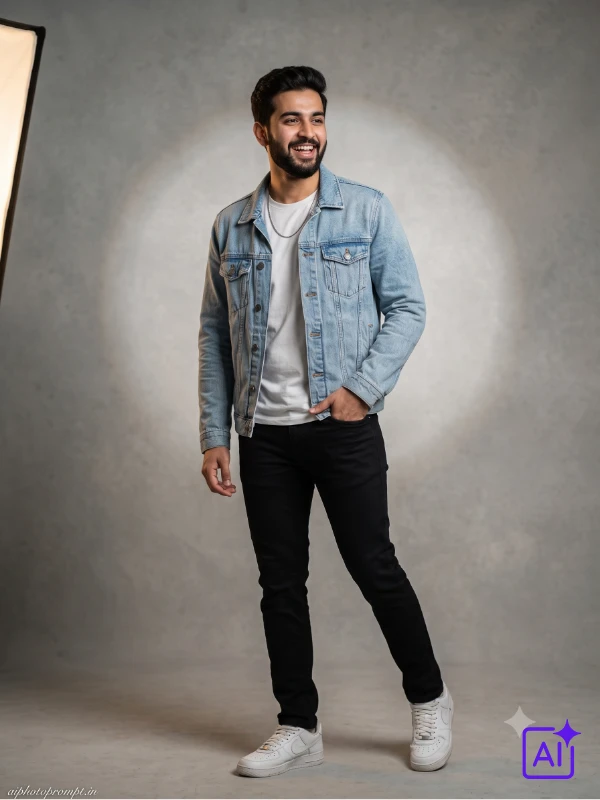
This prompt keeps things light a denim jacket, a white tee, and a candid, almost-laughing expression that feels real, not posed. The grey studio wall with a soft spotlight circle behind you gives it a clean, easy Instagram look. Great for Stories or a casual post where you don’t want to look too try-hard. I did not expect the mid-laugh expression to come out this natural, but it genuinely looks like someone caught you off guard with a camera.
Paste this one into Gemini or ChatGPT and see what happens:
A young man stands with one hand tucked into his jean pocket, weight shifted onto one leg in a relaxed Pinterest style pose, face completely faithful to the reference photo, no changes to his facial structure, skin tone, eye shape, beard, or natural expression whatsoever. His outfit is a Pinterest short outfit for boys, a light blue denim jacket layered over a plain white tee, paired with fitted black jeans and white sneakers, a thin silver chain resting on his collar. His expression is candid, almost mid laugh, eyes looking just past the camera. The background is a soft grey studio wall with a subtle spotlight circle glowing behind him. Lighting comes from a single soft key light positioned to the left, casting a gentle shadow that adds depth without looking harsh. Shot on a Canon EOS R5 with an 85mm prime lens at f1.8, ISO 200, shutter speed 1/200, the depth of field keeping his face crisp while the studio wall fades softly behind. Clean high fashion editorial energy, classy and platform-safe styling throughout, natural beauty, warm cinematic lighting, magazine grade visual finish. Aspect ratio 3:4 vertical. Add “aiphotoprompt.in” as a small watermark at the bottom-left corner, Petit Formal Script font, thin elegant cursive strokes, soft white color rgba(FFFFFF), 1px letter-spacing, subtle premium handwritten signature style, slight transparency, minimal and refined, no background on text, blends naturally into the image.
Also check our another article Saree AI photo prompt for girls
Also check this prompt post: 7 Gemini and ChatGPT Car AI Photo Prompts for Boys That Turn a Selfie Into a Showroom Shoot, Copy Paste Ready
Festival-Ready Without Even Trying
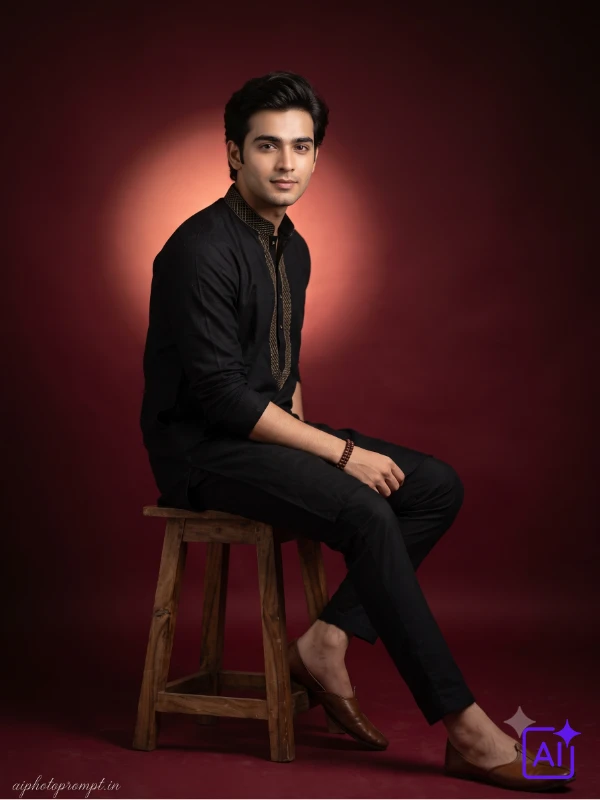
A black embroidered kurta with gold thread detailing and a deep maroon backdrop this one is built for festival posts. The rim light behind you adds a soft outline that makes the whole photo feel premium, almost like a wedding invite shoot. Perfect for Diwali, Rakhi, or any occasion where you want to look sharp in ethnic wear. My cousin used this exact style for her Rakhi post and three people asked which studio she went to.
This is the one copy it and paste into Gemini or ChatGPT:
A young man sits sideways on a wooden studio stool, body angled forty five degrees with one leg extended, facial identity matches the reference image precisely, same bone structure, same eyes, same brows, same lip shape, same complexion, nothing altered. He wears a black embroidered kurta with subtle gold thread detailing along the collar, paired with matching black trousers and simple leather juttis, a wooden bead bracelet on one wrist. His expression is calm and composed, looking directly into the camera with a faint smile. The background is a deep maroon studio backdrop with a warm circular glow positioned just behind his shoulder. Lighting is a soft beauty light from the front mixed with a dramatic rim light from behind, creating a subtle outline around his silhouette. Captured with a Nikon Z8 using an 85mm portrait lens, shallow depth of field, the maroon backdrop dissolving into a soft blur behind his sharply focused face. Premium magazine aesthetic from head to toe, platform-safe and elegant, natural skin finish, cinematic light wrapping the entire frame beautifully. Aspect ratio 3:4 vertical. Add “aiphotoprompt.in” as a small watermark at the bottom-left corner, Petit Formal Script font, thin elegant cursive strokes, soft white color rgba(FFFFFF), 1px letter-spacing, subtle premium handwritten signature style, slight transparency, minimal and refined, no background on text, blends naturally into the image.
Also check this prompt post: 7 ChatGPT Prompts for a Traditional Look for Girls, Copy Paste Ready for Instagram
When You Want Your Photo to Feel Like a Movie Still
This is the moodiest prompt in the list an olive bomber jacket, a black turtleneck, and one strong side light that cuts deep shadows across your face. The charcoal background keeps everything dark and dramatic, almost like a poster shot. It works best as a profile photo or Reels cover when you want an edgy, less-smiley look. This one surprised me the shadow split across the face looks way more cinematic than I expected from a prompt this short.
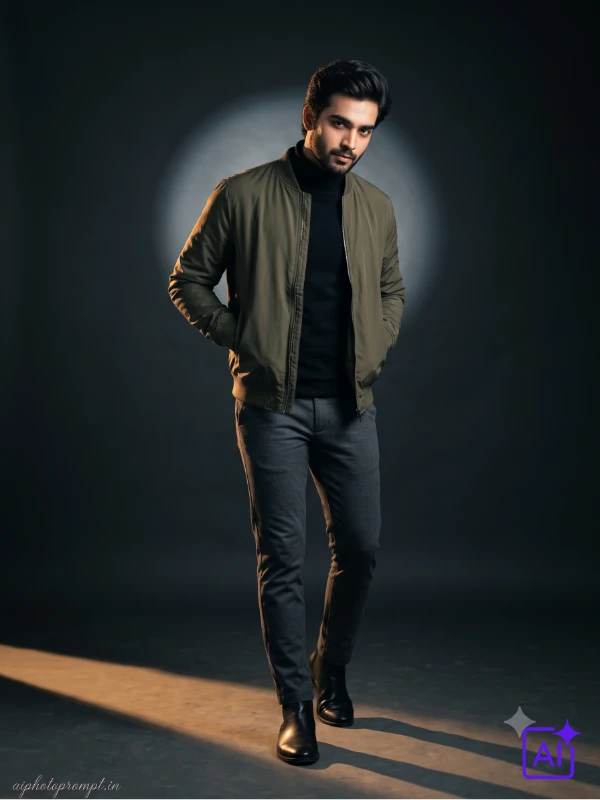
Try this prompt on Gemini or ChatGPT:
A cool amber spotlight is already cutting across the studio floor when he steps into frame, a young man wearing an olive green bomber jacket over a black turtleneck, matched with slim charcoal trousers and black chelsea boots. Every facial detail locked to the reference, same features, same texture, same skin, same beard, same expression as the original photo. He stands with hands casually in his jacket pockets, shoulders slightly turned, chin tilted down while his eyes stay locked on the camera. The backdrop is a dark charcoal wall with a faint circular light glowing softly behind his head. Lighting is dramatic and moody, one strong side light creating deep shadows across half his face while the other side stays softly lit. Shot on a Fujifilm GFX100 II with a 110mm portrait lens, the moody contrast giving the whole frame a graphic novel feel without losing realism in the skin texture. Luxury lifestyle editorial look throughout, tasteful and classy in every detail, platform-safe styling, cinematic light and natural skin tone. Aspect ratio 3:4 vertical. Add “aiphotoprompt.in” as a small watermark at the bottom-left corner, Petit Formal Script font, thin elegant cursive strokes, soft white color rgba(FFFFFF), 1px letter-spacing, subtle premium handwritten signature style, slight transparency, minimal and refined, no background on text, blends naturally into the image.
The Cleanest Profile Photo You Will Ever Have
Grey wool blazer, white crew neck, and an ivory backdrop with even, bright lighting this one is made for a spotless, no-shadow look. It feels like a fashion campaign photo rather than a regular DP. Best for a clean LinkedIn photo or an Instagram grid picture that needs to look neat. The even lighting in this one is honestly hard to get right in real photography, but the prompt nails it without a single harsh shadow.
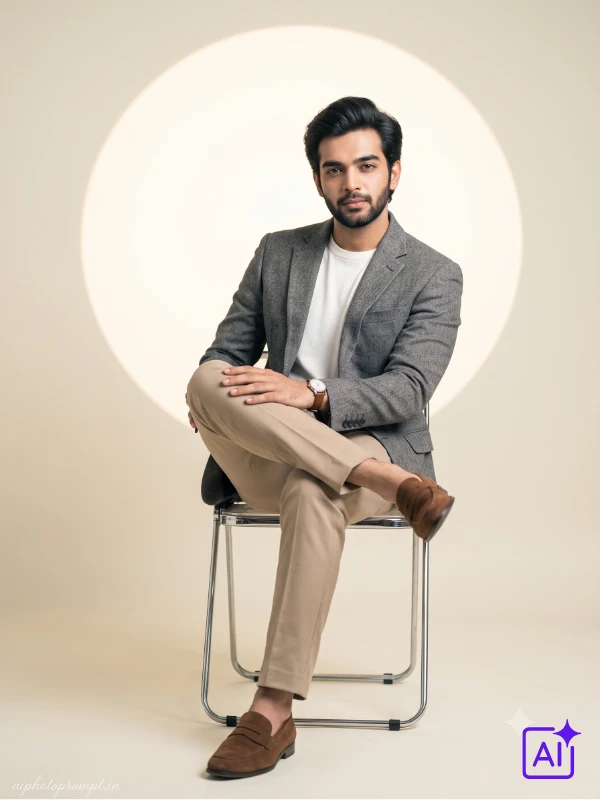
Copy and paste this directly into Gemini or ChatGPT:
A young man is seated on a sleek metal framed chair with his legs crossed, one hand resting flat on his knee, his face stays 100% true to the uploaded photo, his jawline, skin tone, beard style, eye shape, and natural expression remain exactly identical. His outfit is a Pinterest style grey wool blazer over a white crew neck, paired with tailored beige trousers and brown suede loafers, a slim leather watch strap visible on his wrist. His expression carries quiet confidence, gaze fixed calmly on the camera. The background is a soft ivory studio wall with a large glowing circular light positioned centrally behind him, similar to a fashion campaign backdrop. Lighting is bright and even with a gentle fill light removing harsh shadows, giving the whole frame a clean commercial feel. Captured on a Sony A1 II with an 85mm GM lens at f1.4, the ivory backdrop staying soft and creamy while his features remain crisp and detailed. Clean high fashion editorial energy, classy and platform-safe styling throughout, natural beauty, warm cinematic lighting, magazine grade visual finish. Aspect ratio 3:4 vertical. Add “aiphotoprompt.in” as a small watermark at the bottom-left corner, Petit Formal Script font, thin elegant cursive strokes, soft white color rgba(FFFFFF), 1px letter-spacing, subtle premium handwritten signature style, slight transparency, minimal and refined, no background on text, blends naturally into the image.
This One Is for Looking Effortlessly Put-Together
A navy blazer over a white shirt with the top button open, soft window light coming in from one side this look is relaxed but still sharp. The white studio wall keeps the background simple so the focus stays on you. Good for an everyday DP or even a semi-formal LinkedIn photo. The window light in this one is my favourite part it gives a soft, natural glow instead of the usual flat studio light.
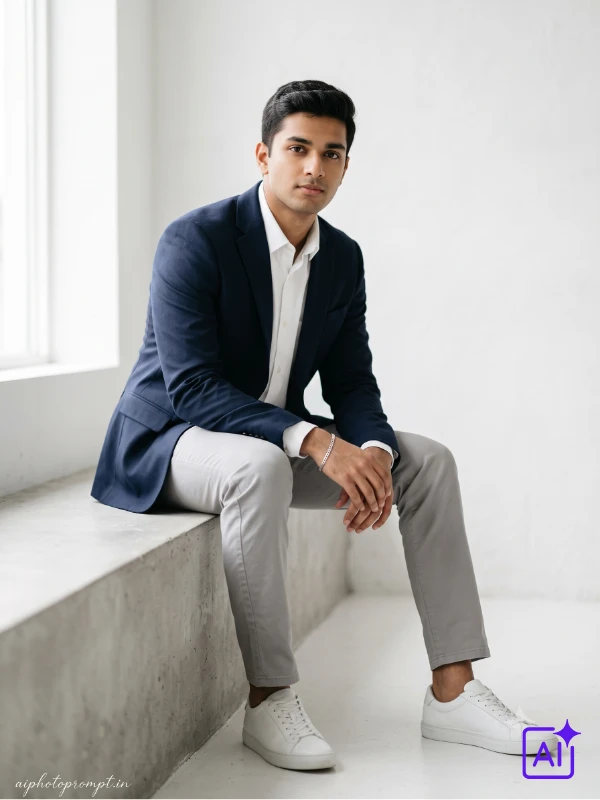
Copy the prompt below and paste it into Gemini or ChatGPT:
A young Indian man sits on the edge of a minimal concrete ledge, one foot flat on the ground and the other leg relaxed, leaning slightly forward with both hands resting loosely on his knee. He wears a fitted navy blue blazer over a plain white shirt with the top button open, paired with straight-cut light grey trousers and white leather sneakers, a slim silver bracelet on his left wrist. His expression is calm and direct, looking straight into the camera with a quiet confidence. The background is a soft white studio wall with large diffused window light coming in from the left side, creating a clean even wash across the frame. Lighting is soft and natural-looking, a broad key light from the left with a gentle fill on the right side keeping shadows minimal but present. Shot on a Sony A7R V with a 85mm f1.4 lens, shallow depth of field keeping his face and upper body sharp while the background fades into a clean creamy blur. High fashion editorial feel with a fresh, approachable energy, platform-safe styling, natural skin tone, magazine grade finish. Aspect ratio 3:4 vertical. Add “aiphotoprompt.in” as a small watermark at the bottom-left corner, Petit Formal Script font, thin elegant cursive strokes, soft white color rgba(FFFFFF), 1px letter-spacing, subtle premium handwritten signature style, slight transparency, minimal and refined, no background on text, blends naturally into the image.
Perfect for Wishing Someone Without Looking Basic
White linen kurta, beige chinos, and warm golden light falling across a textured plaster wall this prompt has a relaxed, festive-casual feel. It sits right between traditional and modern, so it works for a festival wish post or just a regular update. The rim light separating you from the wall adds a small but noticeable premium touch. Honestly, the warm tone on the wall in this one makes it look like golden hour, even though it’s a studio prompt.
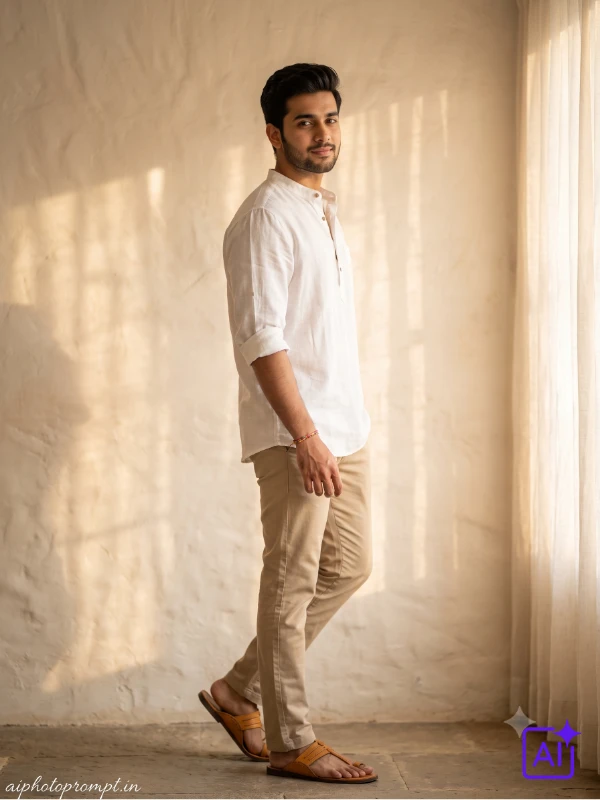
Paste this one into Gemini or ChatGPT and see what happens:
A young Indian man stands with his back very slightly turned, head turned toward the camera over his shoulder in a relaxed three-quarter pose, weight resting on his back foot. He wears a loose white linen short kurta over fitted beige chinos and tan leather sandals, with a thin thread bracelet on one wrist and no other accessories. His expression is easy and natural, a soft half smile, eyes relaxed and looking directly into the lens. The background is a warm off-white textured plaster wall with soft dappled light falling across the surface as if from a nearby window with sheer curtains. Lighting is warm and golden, a soft ambient fill from the front with a delicate rim light from behind separating him cleanly from the background. Shot on a Nikon Z8 with a 85mm f1.8 lens, the warm textured wall staying slightly blurred while his face and outfit remain in sharp, detailed focus. Relaxed editorial energy with a lifestyle feel, slightly ethnic but modern, perfect for a festive casual post or a clean everyday DP, platform-safe, natural skin tone throughout. Aspect ratio 3:4 vertical. Add “aiphotoprompt.in” as a small watermark at the bottom-left corner, Petit Formal Script font, thin elegant cursive strokes, soft white color rgba(FFFFFF), 1px letter-spacing, subtle premium handwritten signature style, slight transparency, minimal and refined, no background on text, blends naturally into the image.
How to Level Up These AI Prompts
A few small changes can make these prompts look even more like you.
- Change the outfit color to suit your skin tone warm browns and olive work great for deeper skin tones, cooler greys and blues suit lighter tones.
- Upload a clear, well-lit reference photo a blurry or dark photo confuses both Gemini and ChatGPT and changes your face shape.
- Don’t add extra details on top of the prompt stick close to the original wording or the tool starts guessing wrong.
- Swap the background wall shade if you already used a similar color in your last post, so your feed doesn’t look repetitive.
- Keep the aspect ratio at 3:4 if you’re posting to Instagram it fits both the feed and Stories.
- Avoid asking for group shots with this prompt style it’s built for one face and gets messy with more than one person.
How to Use These Prompts on Gemini and ChatGPT
The steps are a little different depending on which app you’re using, so here’s both.
On Gemini:
- Open gemini.google.com or the Gemini app.
- Upload your reference photo first.
- Paste the full prompt text in the chat box.
- Tap generate and wait for the image.
- Download it and check the watermark before posting.
On ChatGPT:
- Open chatgpt.com and make sure you’re on GPT-4o.
- Upload your reference photo in the chat.
- Paste the prompt and ask it to create the image.
- Wait for ChatGPT to generate the photo.
- Save it and crop if needed for your DP.
Frequently Asked Questions
Can I copy paste these gemini ai photo prompts for boys directly?
Yes, every prompt here is ready to copy paste into Gemini or ChatGPT exactly as written. Don’t add or remove any words, since even small changes can shift the lighting or outfit details.
Will these prompts work for dark skin tone boys?
Yes, all 7 prompts are written to keep your exact skin tone from the reference photo. Just make sure your uploaded photo is clear and well-lit so the tool captures your tone correctly.
Can I change the outfit or background in these prompts?
Yes, you can swap the outfit color or the background wall shade to match your style. Just change that one part and keep the rest of the prompt exactly the same for the best result.
Which is the best AI prompt for a boys Instagram DP?
The brown suit prompt and the grey blazer prompt work best for a clean Instagram DP. Both keep the background simple and the lighting even, which looks great even in a small profile circle.
How do I make the AI photo on Gemini or ChatGPT?
Just upload your reference photo, paste one of the prompts above, and tap generate. Both apps take less than a minute to create the image once the prompt is pasted correctly.